| overview of additional EDUCATION4.0 features in our interactive tutorials | |||
|
|
|
|
| automatic axis feed | manual operation x-axis | application cutter guard | machine structure |


| WORKING RANGE | |
| Longitudinal | 410 mm |
| Cross | 350 mm |
| Vertical | 450 mm |
| Main drive (100%/25% of duty cycle) | 7.5/13 kW |
| Spindle speed | 1-4,500 rpm |
| Tool taper | SK 40 DIN ISO 7388-1 (formerly DIN 69871) |
| Feed | 5 m/min |
| Readout/positioning control | TNC7 go |
| Weight | approx. 1.950 kg |
| Rigid angular table | |
| Clamping surface | 650 x 375 mm |
| T-grooves | 5 x 14 H 7 |
| Table load | 250 kg |
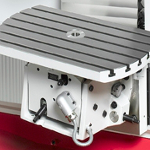
Universal tilting-swiveling table
The universal tilting and swiveling table allows you to position the workpiece in different angular positions. Adjustment is done manually with the rotation angle of the clamping plate being indicated on a digital readout.
- adjustable in 3 axes
- rotational angle: 360°
- swiveling range: +/-30°
- tiltable away from machine by 15°, tiltable towards machine by 35°
- table dimensions: 650 x 395 mm
- 6 T-grooves 14 H7 (63 mm clearance)
- centering hole: 32 mm
- max. table load: 220 kg
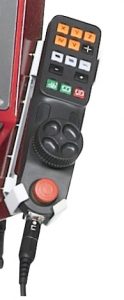
Electronic handwheel
The portable device supports the operator in setting up and retooling the machine due to a close view on the working area.
The handwheel features axis keys, keys for feed rates, and control keys for the machine.
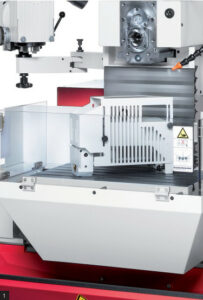
Horizontal spindle and arbor holder
For horizontal milling, you can conveniently separate and pivot the vertical milling head on a support arm.
A further option is working with an arbor holder for additional stability.
It allows the use of long cutter spindles with one or more disk milling cutters up to a diameter of 150 mm.
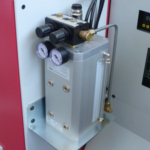
Minimum-quantity lubrication system
As an alternative to conventional cooling, tools can also be cooled with an oil-air mixture over special cooling nozzles.
This technology allows dry and waste-free manufacturing.
Touch probe systems
Combined with the probing cycles of the control, triggering 3D touch probe systems facilitate setup, measuring, and monitoring during manufacturing.
Tool measurement
The following tool data is precisely determined via control cycles:
- tool length
- tool radius
- tool wear
HEIDENHAIN TNC7 go Positioning Control

The WF 410 M is a manually operated machine featuring an easy-to-use path control system and a 16-inch touch screen.
Operation is workshop-friendly, utilizing dialogs, cycles, and graphical assistance.
Programming: The control system employs user-friendly plain-text dialog commands, comparable to those found in other Heidenhain CNC controls.
Safety Function: The AFR function developed by KUNZMANN automatically adjusts the feed rate based on spindle load, effectively preventing overload damage.
User Selection: A key switch allows selection between three operating modes, with the key being removable. The system enables customization of the control scope according to the user’s qualification level.
1.) Manual Mode (3-axis digital readout)
- Manual axis movement using directional keys
- Step increment function
- Definition of feed rates and spindle speeds
- Automatic feed without target value input
- Input and execution of a target positioning block with absolute and incremental/chain dimensions, radius compensation
- Visual display of remaining travel distance
- Graphical positioning
- Display of spindle and axis load
- Tool and workpiece offset tables
- Probing functions for setting reference points (edge, centerline, circle center)
- Electronic handwheel (optional)
Includes all functions of “Manual Mode”, plus:
- Manual Data Input (MDI) – input and execution of multiple target positioning blocks
- Programming
- Graphical simulation
- Single block program run
- Oriented spindle stop
(only in combination with splash guard cabin)
- Manual Mode” and “Single Run Mode” functions and additionally
- “Full Sequence Run” (automatic run of operating cycles and NC programs)
- “Approximate Radius” option
You can download our product brochures and layouts here:
 | KUNZMANN WF 410 M product brochure |
 | KUNZMANN StateViewer |
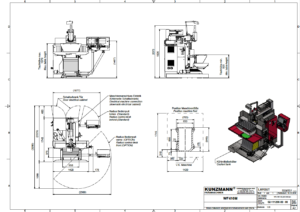 | KUNZMANN WF 410 M layout |
| KUNZMANN WF 410 M – Conventional universal milling and drilling machine Simple | Smart | Superior |
Wie funktioniert das manuelle Positionieren ohne Programmierkenntnisse?
Dank der intuitiven Eingabemaske müssen keine NC-Codes geschrieben werden. Sie füllen einfach die Positionsdatenfelder aus und wählen zwischen inkrementeller oder absoluter Fahrweise. Die Bewegung starten Sie bequem per NC-Start.
Wie funktioniert das schnelle manuelle Positionieren?
Für maximale Geschwindigkeit nutzen Sie die Maske in Kombination mit dem NC-Start. Nach dem Ausfüllen der Zielkoordinaten verfährt die Maschine die Achsen automatisch. Ein besonderer Zeitvorteil: Die Maske kann für Folgebearbeitungen also für ein erneutes Positionieren geöffnet bleiben.
Wie funktioniert das manuelle Positionieren mit dem Handrad?
Sie geben die Zielposition in der Maske vor und behalten beim Anfahren per Handrad die volle Kontrolle. Eine grafische Restweganzeige unterstützt Sie dabei, die Zielkoordinaten präzise und sicher zu erreichen – ganz ohne Programmieraufwand.
Was ist die grafische Restweganzeige und wie hilft sie beim Positionieren?
Die grafische Restweganzeige fungiert als digitaler Skalenring. Sie unterstützt Sie beim manuellen Verfahren über die Handräder, indem Sie die aktuelle Achsposition als oranges Quadrat darstellt. Sobald Sie die Zielposition exakt erreicht haben, erscheint ein schwarzer Punkt als Bestätigung. Dies ermöglicht hochpräzises Arbeiten ohne ständiges Ablesen von Zahlenwerten.
Wie einfach ist die Heidenhain Streckensteuerung TNC7 go in der Bedienung?
Die Bedienung der Heidenhain Streckensteuerung TNC7 go ist einfach und sehr übersichtlich.
Die Steuerung ist perfekt geeignet für Einsteiger oder auch erfahrene Maschinenbediener, welche sowohl manuell als auch über Zyklen arbeiten möchten.
Durch die benutzerspezifische Bedienoberflächengestaltung ist die Steuerung für jeden Benutzer individualisierbar und ermöglicht eine intuitive und einfache Bedienung.
Warum sind unsere Maschinen besonders auch für Ausbildungszwecke geeignet?
Anwender schätzen die KUNZMANN-Maschinen für die Ausbildung aufgrund des klar strukturierten Maschinenaufbaus, der robusten Maschinentechnik, dem einfachen Handling und der modernsten Steuerungstechnik von Heidenhain und Siemens.
Des Weiteren besteht für jeden Kunden die Möglichkeit seine Maschine mit dem digitalen Ausbildungskonzept EDUCATION4.0 zu erweitern. Die Optionen Hybrid Learning Package, MLS Digital Learning, StateViewer und Digitales Messen bieten vielfältige Lern- und Lehrinhalte.
Ist für die Nutzung von EDUCATION4.0 ein Internetzugang notwendig?
Nein, die Maschinen benötigt im Standard keinen Internetzugang.
EDUCATION4.0 ist ein webunabhängiges System. Ein Internetzugang ist daher für den Betrieb nicht zwingend erforderlich.
Können die Inhalte von EDUCATION4.0 beliebig kombiniert werden?
Hybrid Learning Package, MLS Digital Learning, StateViewer und Vernetzte Messmittel können beliebig kombiniert werden. Hier kann die Maschine und Software kundenspezifisch konfiguriert werden.
Was genau ist das Hybrid Learning Package?
Das Hybrid Learning Package ist ein virtuelles Abbild der realen Maschine. Hier werden der Gesamtaufbau, die verschiedenen Baugruppen der Maschine, sowie auch die Bedienung einfach und verständlich erklärt. Zusätzlich gibt es Wissensabfragen um das erlernte auch direkt anwenden zu können. Ebenso gibt es die Gamification-Spielfunktion um Wissen spielerisch zu vermitteln – alles immer an der realen Maschine oder dem virtuellen Maschinenzwilling. Weitere Details können den Videos auf unserer Website entnommen werden.
Welche Vorteile bietet die MLS-Plattform?
Die MLS-Plattform der Nachwuchsstiftung Maschinenbau ermöglicht es alle Lerninhalte auch mobil jederzeit abrufen zu können. D.h. der Lernende muss nicht an der Maschine stehen, sondern kann die Inhalte jederzeit webbasiert abrufen und abarbeiten. Durch die userbasierte Lizenzzuweisung hat der Ausbilder immer den Lernfortschritt im Überblick.
Welche Vorteile bietet der StateViewer?
Der StateViewer ist das perfekte digitale Dashboard des Maschinenparks. Der User hat die Möglichkeit nicht nur Online-Maschinen sondern auch Offline-Maschinen bequem und einfach anzulegen – von der Fräsmaschine bis zur Bohrmaschine alles im Blick. Dokumenteverwaltung, Wartungsintervalle und Wartungslogbuch, Maschinenberechtigungsverwaltung, Chat-Funktion und vieles mehr sorgen für mehr Digitalisierung im Arbeitsalltag.
Kann der StateViewer den Funktionsumfang der Maschine einschränken?
Die Einschränkung des Maschinenfunktionsumfang ist durch die Nutzung der Berechtigungsverwaltung möglich.
Der Vorgesetzte hat dadurch die Möglichkeit den Funktionsumfang genau auf den Wissensstand des Bedieners zu reduzieren. Drehzahl, Vorschub, Betriebsarten und vieles mehr einfach und individuell einstellbar.
Gibt es Voraussetzungen um den StateViewer nutzen zu können?
Um den StateViewer nutzen zu können müssen die Online-Maschinen ins Firmennetzwerk eingebunden werden – alternativ wäre auch eine Netzwerk-Insellösung möglich. Gerne unterstützen wir hier auch.
Die Software wird dann auf dem Netzlaufwerk abgelegt und kann durch die entsprechend gewünschten User verwendet werden.
Werden Einträge im Wartungslogbuch automatisch erfasst?
Wenn die Wartung an der Maschinensteuerung zurückgesetzt wird, wird automatisch im Wartungslogbuch ein Eintrag erstellt. Hier werden dann auch bestimmte Betriebszeiten automatisch eingetragen.
Ist es möglich Kurznachrichten vom StateViewer an die Maschine und umgekehrt zu senden?
Durch die Chat-Funktion des StateViewer hat man die Möglichkeit Kurznachrichten zwischen StateViewer und Maschine auszutauschen. Es wird hierbei auch immer ein kleiner Chatverlauf angezeigt.
Was versteht man unter vernetzte Messmittel?
Hierbei hat der Ausbilder die Möglichkeit anhand von PDF-Zeichnungen per Software Messprotokolle zu erstellen. Dies funktioniert intuitiv und einfach am PC. Diese werden dann an die Maschine gesendet und dort mit Mahr-Messmittel mit integrated Wireless bearbeitet. Wenn alle Messungen durchgeführt wurden kann dann auf einfache Weise das Protokoll ausgegeben werden und man erhält ein vollständiges Messprotokoll mit visuellen Darstellungen.

WF 410 M - TNC7 go EDUCATION4.0
WF 410 M - TNC7 go EDUCATION4.0WF 610 M - TNC7 go EDUCATION4.0
WF 610 M - TNC7 go EDUCATION4.0
WF 410 MC+ EDUCATION4.0
WF 410 MC+ EDUCATION4.0
WF 610 MC+ EDUCATION4.0
WF 610 MC+ EDUCATION4.0